Must You Open Port 25 to Send SMTP Mail? Actually No—This Article Explains the Principle

Repost license
Request authorization before reposting and retain the authorization code, original URL, and go/affiliate links.
Original URL:https://www.geekcorelab.com/post/smtp-send-mail-port-25-not-required
The commercial link is an authorized go short link that must stay on the reposted page. It records the source before sending readers to the original article.
The common SMTP ports are 25 465 587. To prevent spam, providers usually block these ports, so I had a question:
Sending email is the act of sending data packets rather than a peer-to-peer connection. Why does the local side need to open these ports in order to send mail?
To discuss this issue, we first need to distinguish one concept: sending mail here refers to sending mail by connecting to an existing mail server through a mail client rather than through protocols such as SMTP. For example, the send function in Gmail Web first passes what you want to send to Google's servers, and then Google's servers send the email. This definitely does not require opening mail ports locally, because the operations related to the email itself are all completed on Google's servers, so it is not within the scope of this discussion.
The Beginning of Testing
A few years ago, when I was playing around with WordPress, I accidentally found that I had received an email from my website, but I had not configured any SMTP service. I was very curious about where the email came from, and I even thought it might have come from the intranet, because at that time my server was converted from an old laptop.
So I came to believe that sending mail does not require opening ports as people online say.
However, the good times did not last long. Not long after, I suddenly found that I could not send mail again, which left me extremely confused, so I kept using SMTP to connect to a third-party mailbox to send mail.
Starting the Test
After many similar discussions, I decided to test again according to the environment where mail had been sent successfully before, so I wrote a simple PHP script to test.
However, I encountered a new problem
sh: line 1: /usr/sbin/sendmail: No such file or directory
Yes, PHP's mail() function is actually not a native feature; it uses sendmail (which quite fits the idea of not reinventing the wheel).
So I installed this thing on the system and tested again
After running it, I found that PHP did not report any errors during execution, so let's wait for the email.
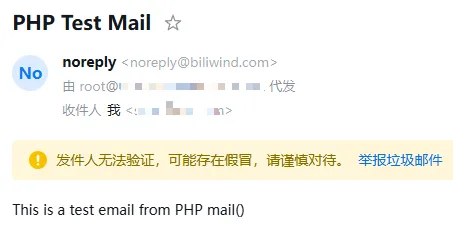
To my surprise, I successfully received the email
I noticed the 由 xxx 代发 in it, which matches that strange email I received a few years ago; both are the server's user+FQDN
Let's figure out what this email actually is by directly viewing the raw format of the email
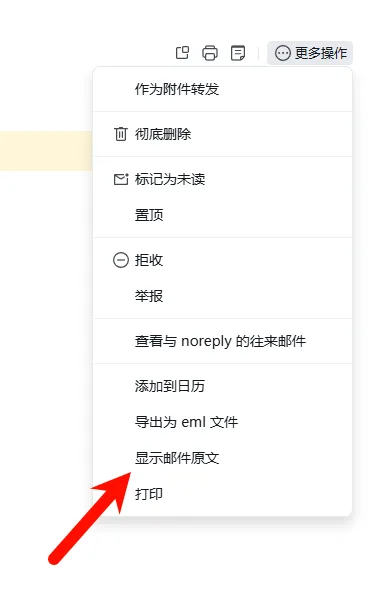
In the raw format, the sender IP can be seen very clearly
localhost [127.0.0.1]
At this point, what an expert in the group said enlightened me
For sending mail, you only need outbound traffic not to be banned for destinations on port 25.
So I installed tcpdump on the server, started capturing packets on port 25, and began the mail-sending test again
I saw the complete SMTP flow in the packet capture results
220 就绪 -> EHLO 协商 -> STARTTLS 加密 -> 邮件指令交互 -> 连接关闭
We also need to rule out the last possibility: that UPnP/NAT temporarily opened the mail port for us
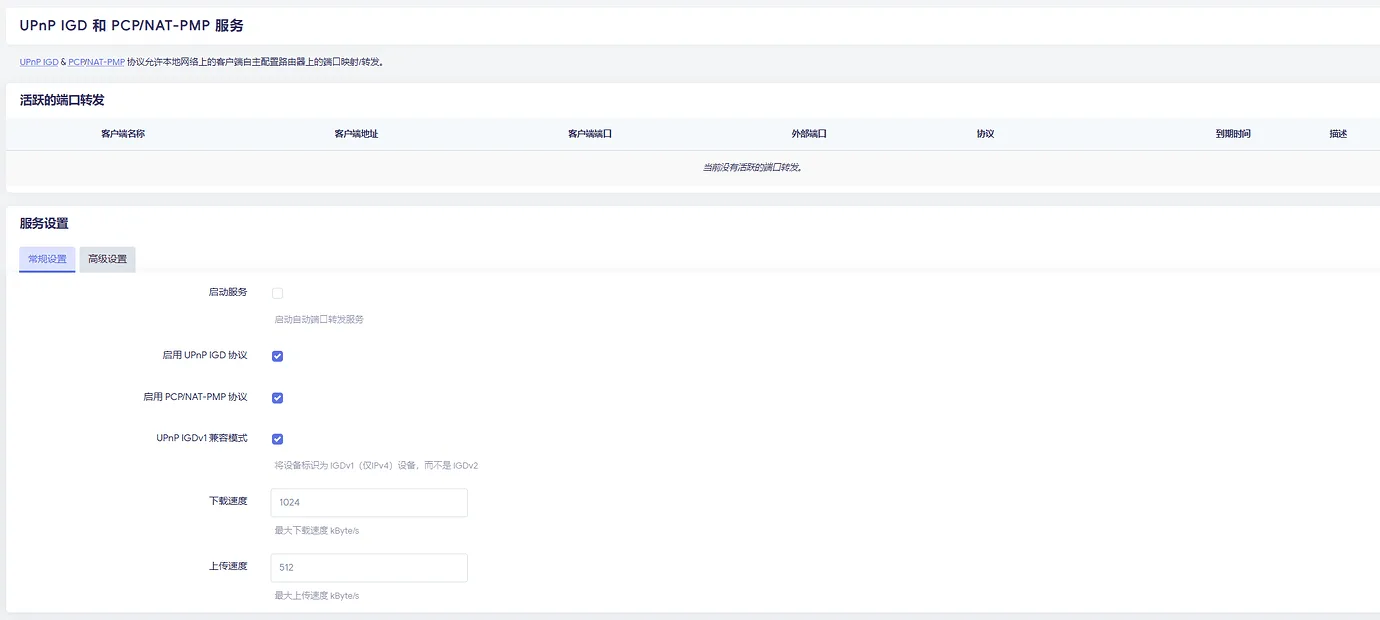
Then I found that not only was there no mapping record, I had not even enabled this service
Then the truth became clear: sending mail does not require the outside world to be able to connect to the local mail port
The Final Test
To ensure the accuracy of the conclusion, we need another tool, iptables
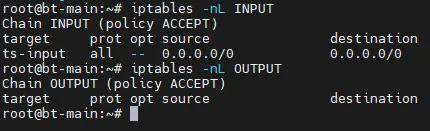
Let's check the current contents of the INPUT and OUTPUT chains. You can see that the INPUT chain allows everything, while the OUTPUT chain has no rules, and the default policy of both chains is ACCEPT
We DROP all addresses with destination port 25 and try again
iptables -A OUTPUT -p tcp --dport 25 -j DROP
After stopping the previous packet capture and starting a new one, I ran the test PHP script again and found that PHP still indicated successful sending, but tcpdump captured nothing, and I received no email
Then it can be confirmed: to send mail, the local side only needs to be able to connect to the mail server that belongs to the target mailbox; incoming connections do not need to be allowed
However, drawing a conclusion just like this is not rigorous. I also need to delete the iptables rule I just created and add a new rule to block incoming connections on ports 25, 465, and 587
iptables -A INPUT -p tcp -m multiport --dports 25,465,587 -j DROP
Strangely, not only did I not receive a new test email, packet capture did not capture anything either
Unable to believe it, I checked the iptables rules again
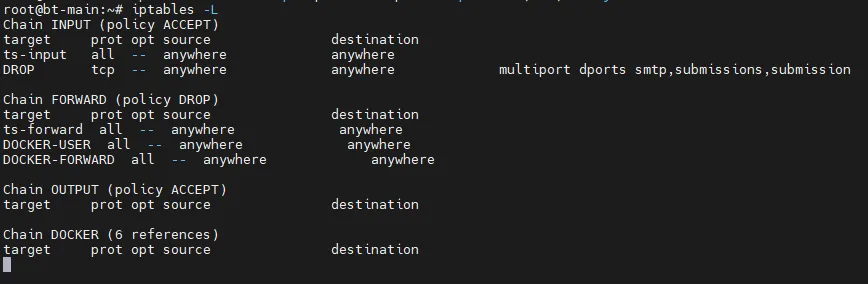
It did not block outgoing connections, but I quickly realized that it seemed the TCP handshake had failed. However, even if the handshake fails, at least a SYN packet should have gone out
After a series of packet captures and tests, I found that the new rule blocked 127.0.0.1 from connecting to the local sendmail service, so my laziness kicked in, and I'll just write this much
The above content was written a year ago. Today I picked it back up and continued analyzing and writing
First, why did the problem occur in the end?
Because something was missing when iptables applied the rule: specifying the interface. If you do not use -i to specify the interface to DROP, the loopback interface (lo) will also be accidentally affected, causing the problem
What Exactly Gets Blocked When Ports Are Blocked?
This is not like residential broadband prohibiting website hosting, where all inbound traffic from external connections to ports 80 and 443 is dropped; rather, it blocks the destination port 25 of outbound traffic, that is, it does not allow your machine to connect to other people's SMTP servers
This is a measure taken by residential broadband and data centers to prevent spam. So do mail service providers have measures? Yes, they do too.
More and more mail service providers are starting to verify PTR reverse DNS, SPF, and DKIM
If there are no corresponding records, at best the email goes straight to spam, and at worst it is discarded outright
Comments
Discussion
Be kind and keep the discussion friendly.
Discussion
0 comments